About The Designer
Hello, my name is Samantha. I am 31, I am an army wife , A DRILL SERGEANTS WIFE. I have survived 3 deployments and endless field training. Rick and I have been married for 13 years in August. I am a stay at home Mom of 3. Richard is 11, Christianna is 9 and Diana is 4. I am an avid photographer. I have many hobbies as well as photography. I like to read, write, make scrap Kits, posers, write tutorials, I have been creating tags since 2003. I am currently attending school for Digital Photography and Media Arts.
I love creating.. Please come back and visit often..


I love creating.. Please come back and visit often..
Social Butterfly
So Rick tells me all the time that I am a social butterfly. So I thought I might as well add these to my blogs as well..


Showing posts with label FTU. Show all posts
Showing posts with label FTU. Show all posts
Wednesday, May 12, 2010
All My Love
 1:10 PM |
 Posted by
Sami

CREATIVE ADDICTIONS EXCLUSIVE TUTORIAL

You can find this tutorial Here
Remember you dont have to be a member to view
the tutorials on Creative Addictions..


 Labels:


Saturday, April 17, 2010
Elegant Romance
This Tutorial is featuring the
It is a FTU Kit. No outside tubes or Masks Used.
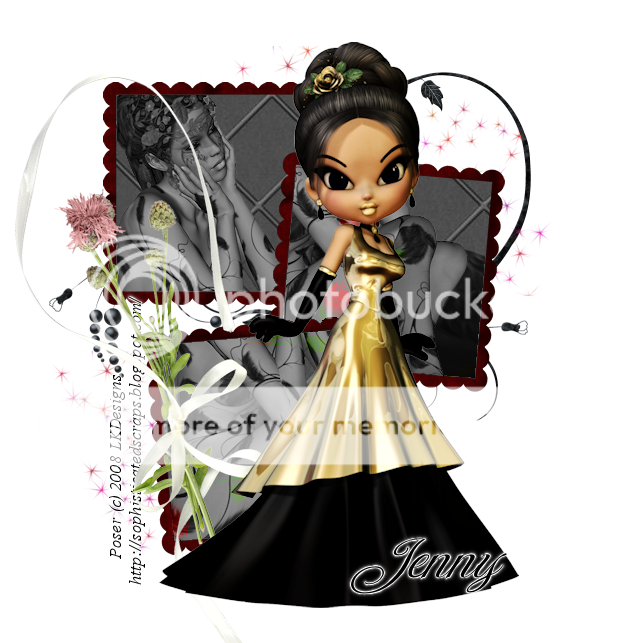
This tutorial was written on 4/17/2010 by Samantha.
Any Similarities to this is complete coincidental.
Create new Raster layer 650x 650
open your fram cluster
copy and paste as new layer
reszie down by 20%
open paper 4
copy and paste as new layer
Move below the frames
Grab your magic wand and
click inside of the frames
ONE BY ONE
Go to selections, modify and expand by 7
Go to selections invert
Highlight your paper layer and hit delete
grab your dark swan
Copy and paste as new layer
Place different areas in easch part of your
frames
Add a luminance legacy to those.
open doddle 2
copy and paste as new layer
moving below your paper layer
in the center
open stardust
copy and paste as new layer
move to the top right below your paper
Duplicate and mirror
open poser2
copy and paste to ur liking
Placing in the center
open the flowers with the bow
copy and paste as new layer
resize to ur liking
Free rorate left by 90
Move to the left
Add your name and copyright ur done.
open your fram cluster
copy and paste as new layer
reszie down by 20%
open paper 4
copy and paste as new layer
Move below the frames
Grab your magic wand and
click inside of the frames
ONE BY ONE
Go to selections, modify and expand by 7
Go to selections invert
Highlight your paper layer and hit delete
grab your dark swan
Copy and paste as new layer
Place different areas in easch part of your
frames
Add a luminance legacy to those.
open doddle 2
copy and paste as new layer
moving below your paper layer
in the center
open stardust
copy and paste as new layer
move to the top right below your paper
Duplicate and mirror
open poser2
copy and paste to ur liking
Placing in the center
open the flowers with the bow
copy and paste as new layer
resize to ur liking
Free rorate left by 90
Move to the left
Add your name and copyright ur done.
Monday, March 22, 2010
Easter Morning
Scrap Kit by Gina.
It is a FTU kit that you can download from her blog
Tube by Elias Chatzoudis.
Do not use with out a license to do so.
Mask 226 by Weescotslass Creations

This tutorial was written by Samantha on 22March2010
any similarities to this is completely coincidental.
Create new Rater layer 600x600
open frame 1
copy and paste as new layer
resize down by 70%
open your tube close up
copy ans paste as new layer
Move below your frame
Grab your magic wand and select inside the frame
Go to selection, modify and expand by 5
Highlight your tube layer
selections, invert and hit delete
open paper 5
copy and paste as new layer
Go to layers, load and save mask
merge mask group
add a drop shadow to your mask group
open doodle2
copy ans paste as new layer
move below all other layers
duplicate and flip and mirror
open butterfly4
copy and paste as new layer
Mirror and resize down by 60%
See mine for placement
Open your full version of the tube
copy and paste as new layer
see mine for placement
Now go back to the tube that is below
the frame and add a luminace legacy to it
open candybunny1
copy and paste as new layer
resize by 60%
Move below yuor full tube
and place near the bottom of the frame
Open 3 of your eggs
I am using eggs 1,3,and 5
copy and paste all ass new layer
Resize all 3 eggs by 40% and then by 80%
Move below your candy bunny
Add your name and copyright
save and your done
open frame 1
copy and paste as new layer
resize down by 70%
open your tube close up
copy ans paste as new layer
Move below your frame
Grab your magic wand and select inside the frame
Go to selection, modify and expand by 5
Highlight your tube layer
selections, invert and hit delete
open paper 5
copy and paste as new layer
Go to layers, load and save mask
merge mask group
add a drop shadow to your mask group
open doodle2
copy ans paste as new layer
move below all other layers
duplicate and flip and mirror
open butterfly4
copy and paste as new layer
Mirror and resize down by 60%
See mine for placement
Open your full version of the tube
copy and paste as new layer
see mine for placement
Now go back to the tube that is below
the frame and add a luminace legacy to it
open candybunny1
copy and paste as new layer
resize by 60%
Move below yuor full tube
and place near the bottom of the frame
Open 3 of your eggs
I am using eggs 1,3,and 5
copy and paste all ass new layer
Resize all 3 eggs by 40% and then by 80%
Move below your candy bunny
Add your name and copyright
save and your done
Wednesday, March 17, 2010
Dark Beauty
This Beautiful tutorial is featuring a
wonderful scrapkit by Jessica @ Gothic Inspirations
Artwork is By Ismael Rac.
Please do not use if you dont have a license to do so.
You can purchase his work and a license @ AMI .
Font is TheNautiGirl

This tutorial was written on 17March2010 by Samantha
This is completely my imagination.. Any similarities to this is completely Coincidental.
Create new Raster layer 600x600
open frame 3 copy and paste as new layer
open your tube copy and paste as new layer
move below your frame
Grab your magic wand
highlight your frame layer
select inside the frame
Once you see the marching ants
Go to selections, modify and expand by 9
highlight your tube layer
Go to selections, invert and hit delete
open your tagback grid copy and paste as new layer
resize down by 90%
Move below your tube layer
open paper 14 copy and paste as new layer
Move just about your tagback layer
Grab your eraser and carefully erase the paper
On the outside of the frame.
go back to your tube layer and Add Luminace Legacy to it
Mirror your tube
open the cross with ribbon copy and paste as new later
Resize down by 80 %
Move to the top left of your frame
Open your tube once again
Copy and paste as new layer
Make sure it is above all other layers
Mirror and move to the right
open the bloodsplatter
copy and paste as new layer
Move just above your tag back layer
Duplicate 4 times and place in the
4 corners of the frame
Add your name and copyright.
dont forget to save. Your done..
open frame 3 copy and paste as new layer
open your tube copy and paste as new layer
move below your frame
Grab your magic wand
highlight your frame layer
select inside the frame
Once you see the marching ants
Go to selections, modify and expand by 9
highlight your tube layer
Go to selections, invert and hit delete
open your tagback grid copy and paste as new layer
resize down by 90%
Move below your tube layer
open paper 14 copy and paste as new layer
Move just about your tagback layer
Grab your eraser and carefully erase the paper
On the outside of the frame.
go back to your tube layer and Add Luminace Legacy to it
Mirror your tube
open the cross with ribbon copy and paste as new later
Resize down by 80 %
Move to the top left of your frame
Open your tube once again
Copy and paste as new layer
Make sure it is above all other layers
Mirror and move to the right
open the bloodsplatter
copy and paste as new layer
Move just above your tag back layer
Duplicate 4 times and place in the
4 corners of the frame
Add your name and copyright.
dont forget to save. Your done..
Thursday, February 25, 2010
Irish Luck
A mini Tut featuring a great Irish Luck Kit by Addicted 2 Scraps
It is a FTU Kit. So if you download please Leave Lots of love
Tube used is Ismael Rac. You can purchase his work and a
license to use at AMI .
Mask178 by Weescotslass.

Create New raster layer 600x600
you can flood fill white, but I prefer transparent. Open paper 4
copy and paste as new layer
Open your mask as a new image
Go to layer, New Mask Layer, From Image
Open your mask of choice.
Merge Mask Group
open your tube
copy and paste as new layer
place in the center of your Merged Mask
open element 10 copy and paste as new layer
Move below your tube layer toward the bottom
Duplicate and mirror
open element 14
copy ans paste as new layer
move below your tube layer as well
Add Text of choice.
Copyright and your name
Save and your complete.
Tuesday, February 9, 2010
Bee My Valentine

Scrap kit Sweetheart (FTU) By Jenny's Designz
Template 141 by Kristin @ Toxic Desirez
Tube by Ismael Rac - Purchased @ Artistic Minds
Mask 218 by Weescotslasscreations
Open template hit Shift D.
This will duplicate your template Close your origional file
Delete your copyright layer
Canvas size to 750x650
Hide your white bakc ground layer
Open paper 4 copy and paste as new layer
Move above your pink rectangle layer
and hide the paper layer
With your rectangle layer highlighted
Grab your magic wand and select inside the rectangle
unhide your paper layer and highlight it
To to Selections and Invert
hit delete ( this should delete the excess paper )
Open your tube
copy and paste as new layer
carefully erase the bottom part
of your tube that is below your circle layer
Open Frame 3
copy and paste as new layer
resize by 73% and then again by 95 %
Move below your tube layer
Like i did
highlight your white background layer
open paper 5
copy and paste as new layer
Open Mask of Choice
Go to layer- New Mask Layer
Load from Image
Merge Mask group
open your seedbeads
copy and paste as new layer
Move above your mask layer
Resize by 95 %
Add your copyright and name
Save and your complete
I would love to see your results
Please send them too
sweetindulgence09@gmail.com
xoxo,
Samantha
Thursday, October 29, 2009
Dark Angel
New FTU TUT using Beth's Dark Angel Kit
I created the posers.
You can downloading the kit at Ginger Snap Scrapz
You can download the posters and see more at

We can resize later if needed
open frame 3 copy and paste
as new layer
Open a poser or tube of choice
I am using 2 posers that I have created
Copy and paste as new layer
place below your frame
Grab your magic wand
click inside the frame
go to selections and invert
highlight your poser layer and hit delete
open paper of choice
I am using paper 15
copy and paste as new layer
move below your poser layer
Grab your magic wand
click inside the frame
go to selections and invert
highlight your paper layer and hit delete
open your butterfly2
copy and paste as new layer
place at the top of the frame
resize to 85%
add your name and copyright
save and your done.
Its a simple and sweet tutorial
Saturday, October 10, 2009
Simply Sexy
Scrap Kit I Love Chrome By Ziggyfan.
It is a free to use kit. You can download here.
If you download be sure to leave her lots of love
Artwork of Ismael Rac, you can purchase his work and a
license to use @ AMI .

and flood fill white
grab your rectangle tool and create a rectangle
go to selections, modify and add border
Outside border by 10
Flood Fill your border on your frame with color of choice.
I am using black
Grab your tube copy and paste as new layer
Move above your tube layer and erase the
part of her legs that are below the frame
open paper of choice.
I am using paper 2
Copy and paste as new layer
Move below your frame layer
Go to selections expand by 3
making sure your paper layer is highlighted
Selections invert and hit delete
open your star
copy and paste as new layer
resize by 70%
move to the top right of your frame
Open your ipod
copy and paste ipod as new layer
resize by 50%
Move to the bottom left
Copy and paste headphones as new layer
resize by 50%
place near your star top right
open your shorts
copy and paste as new layer
resize by 60%
Place bottom right
Open your shirt
copy and paste as new layer
resize by 60%
move blow your shorts
Add your name, copyright and save.
You are done.
Send your results to Scrapsbysamantha@gmail.com
Subscribe to:
Posts (Atom)


My Blinkies


Hang Outs

Promoting At


My Favorite Reads


Lorem Ipsum
Background Layout and Header made by me Samantha.
Scrap kit used for the layout is Amour by Addictive Pleasures.
Tube for header by Ismael Rac Scrap Used is Amour
Scrap kit used for the layout is Amour by Addictive Pleasures.
Tube for header by Ismael Rac Scrap Used is Amour